A Shopify redirect is one hop until the address moves
How a 301 redirect works on Shopify, where you set one or import a list, and how a redirect chain grows when an address moves again.
The short version. You renamed a product and its web address, so the old link, the one in last spring’s newsletter, now lands on a 404, the error a browser shows when an address points at nothing. A redirect fixes that by telling visitors and Google that the address has moved, and a 301 is the permanent kind. In Shopify you write one under Content, then Menus, then View URL Redirects (a URL is just a web address), or import a list from a CSV file, a spreadsheet saved as plain text. The old address has to be dead for the redirect to fire. Each redirect a visitor follows is a hop, one step to the next address. If the new address moves too and the first redirect is left alone, that adds a second hop, and a run of hops is a chain, which Shopify’s help page on URL redirects does not mention. Google follows up to 10 hops and advises redirecting to the final address directly. Rabbot catches redirect loops outright, a loop being a chain that leads back to where it started, and it flags chains that grow a hop at a time. It does not create redirects.
How a 301 redirect works
Every address a browser asks for gets an answer that starts with a status code, a three-digit number saying how the request went. A 404 says there is nothing here. A 301 says the page has moved for good and gives the new address. MDN, the reference web developers use, says a browser that receives a 301 automatically requests the new address, so the visitor arrives and rarely notices. The cost it admits to is “the small performance hit of an additional round-trip”, which just means one more trip to the server, the computer that holds the page, and back.
Google treats a 301 as a “strong signal” that the new address is the one to process, and shows the new address in search results, where a temporary redirect keeps the old one.
Picture the yellow diversion signs at the end of a road that has been closed for good. The driver is a browser, or Google’s crawler, the program that visits pages so Google can list them. The sign is the redirect, and obeying it is one hop. One sign costs almost nothing, and a string of them put up in different years is a route that nobody has driven from the start.
Setting a redirect in Shopify
Shopify’s help page puts the list under Content, then Menus, then View URL Redirects. Choose Create URL redirect, type the old address into “Redirect from” and the new one into “Redirect to”, and save. Shopify says redirects start working immediately. The new address can be a path on your own store (the part after your domain name) or a full web address.
The old address has to be dead. Shopify only redirects from a broken address, one that shows “Page not found” or a 404, and if the address still loads a valid page, its help page says the redirect will not work. Check that first when a redirect is not working. Next come a typo in either box and a cached answer, which is just a copy your browser remembered, so clear it or try another device.
For a whole list, use the import on the same screen. Choose Import, upload a CSV file, review it, and choose Import redirects. Shopify’s sample file has two columns, “Redirect from” and “Redirect to”, and one example row that sends /example_product.php to /products/example-product. The list holds up to 100,000 redirects (20,000,000 on Shopify Plus), and Shopify suggests a third-party app if you need to create a large number.
Shopify’s page is a clear account of how to write a redirect and fix one that does nothing. It says nothing about chains or loops among the redirects you write.
What Shopify does when a handle changes
A handle is the last part of a page’s web address, the blue-shirt in /products/blue-shirt. Shopify’s help pages say a handle is generated automatically when you create a product or a collection. You can edit it later, but not too often, or the product or collection “might not display in search engine results”. I read those pages on 29 September 2026.
The redirect for the old address is a separate step. On a collection, the steps say “Select whether to create a redirect from the old URL to the new URL”, so it is a choice on the edit screen. In Shopify’s Admin API, the route apps and scripts use to change a store’s data, the product update has a field called redirectNewHandle. The reference says that when it is true, “the old handle is redirected to the new one automatically”. If you rename handles with a script, ask for the redirect explicitly rather than assuming it.
Shopify’s help page describes one case where it deletes a redirect for you. If you hide a collection, redirect its address, and later make the collection visible again, the redirect “is automatically deleted because redirects only work for URLs that return 404 errors”.
Here is what I could not find. Neither the help pages nor the API reference say what happens to an earlier redirect when the address it points to moves again, and I would rather tell you that than guess. Shopify makes a redirect when you ask and removes one when its old address comes back to life. Everything between those two events is a list you keep.
Where a chain comes from
A chain is a redirect whose destination redirects again. Google writes it as Page 1 to Page 2 to Page 3, and each extra hop is another round-trip for whoever is following. On the road, a council closes a street and signs a diversion. A year later it closes the street that first sign pointed to and puts up a second sign there. Nobody goes back to change the first, because the first was correct when it went up.
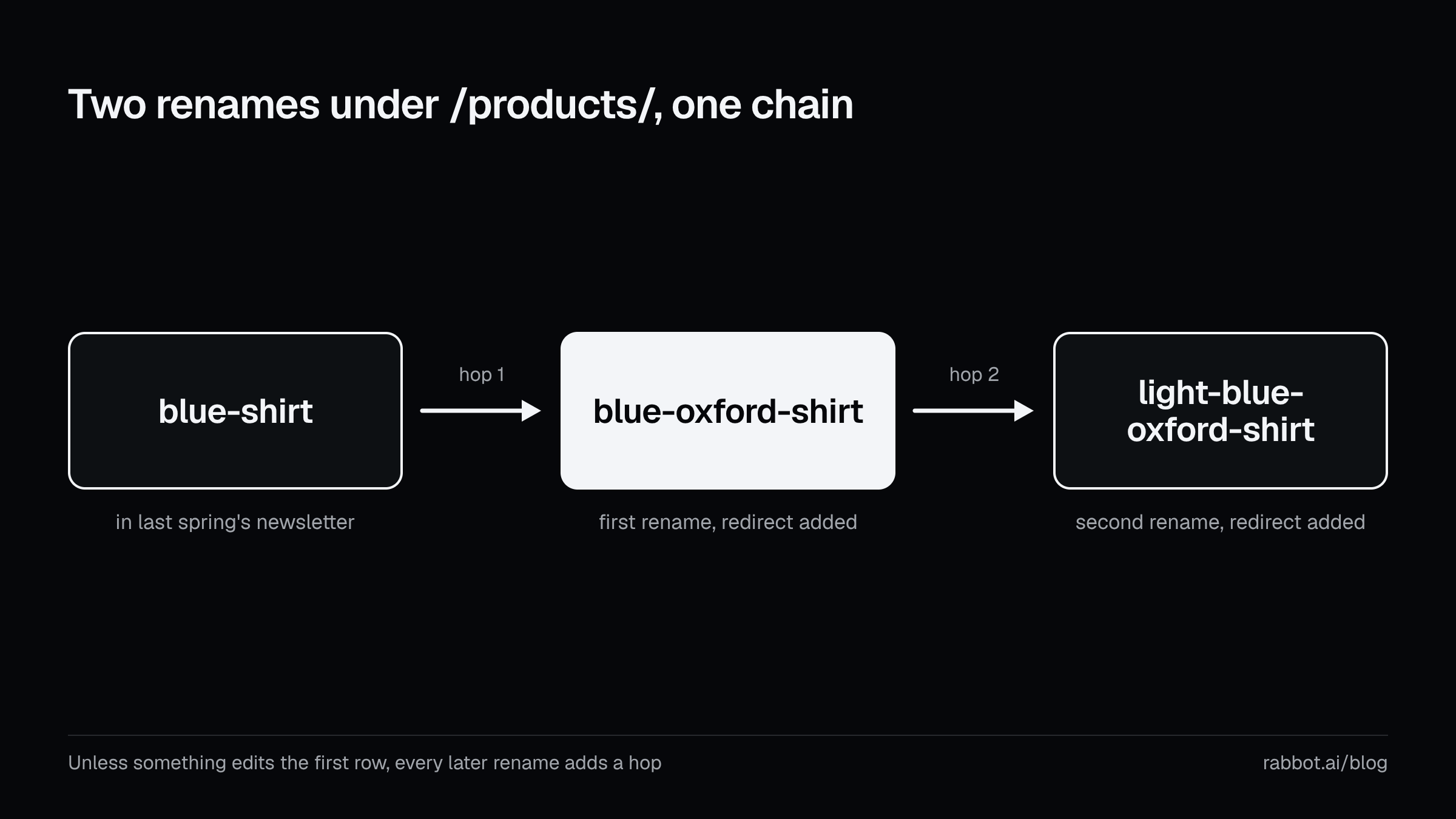
In store terms, /products/blue-shirt becomes /products/blue-oxford-shirt, and you add a redirect. A year on, the product becomes /products/light-blue-oxford-shirt, and you add another. Unless something edits the first row, a link to the original address now takes two hops, and each later rename adds another.
A migration, which is a move to Shopify from another platform, is the other way in. Shopify’s migration guide says old links to specific pages “likely won’t load” once you move to Shopify, so you set up redirects in advance. Google says to keep redirects “for as long as possible, generally at least 1 year”. So the migration rows stay, which I think is right, and every rename after launch lands on top of them. If you run migrations for clients, the file you hand over holds the first sign of any chain that grows from those addresses.
Some hops are not rows at all. Shopify sends a visitor who arrives on any other domain you have listed to your primary domain, the one you have told Shopify is the main address. So a visitor from an old domain can take that hop and then a row from your list. Every hop was a sensible fix on the day someone added it, and the visitor pays for the sum.
A loop is a chain that ends where it began. MDN describes “a loop that will never be finished and no page will ever be found”, and says it can spread over several servers “which each don’t have the full picture”. When the servers miss it, browsers detect the loop and show an error, and the visitor can do little about it.
The cost of a chain, and the one worry worth keeping
You are allowed to find the advice on chains alarming, and I did, until I looked at the numbers Google publishes. Its crawlers follow up to 10 redirect hops by default, and its site-move guide says to avoid chaining redirects and to redirect to the final destination directly. Where that is impossible, it says to keep a chain “ideally no more than 3 and fewer than 5”, and it adds that chaining slows visitors down.
I could not find a source that puts a ranking cost on a two-hop chain, so I will not invent one. A chain of two, from one rename, sits inside every number Google gives, though it is still longer than the advice, which is one hop.
The worry worth keeping is the chain nobody is counting. A short chain costs little and a long one costs more, and every rename can lengthen it while nothing in the Shopify pages I read counts the hops for you. Rows also disappear. Shopify deletes a redirect when a hidden collection becomes visible again, and anyone with access to the list can delete one by hand. Remove a row from the middle of a chain and every older address behind it lands on a 404.
Checking your own list
Shopify’s help page describes an export on the same screen as the import, so you can check the list with nothing but a spreadsheet. Export the list, open the file, and look for any address in the destination column that also sits in the source column. A spreadsheet function such as COUNTIF, which counts how often a value appears, will do it for a long list. Each match is a chain.
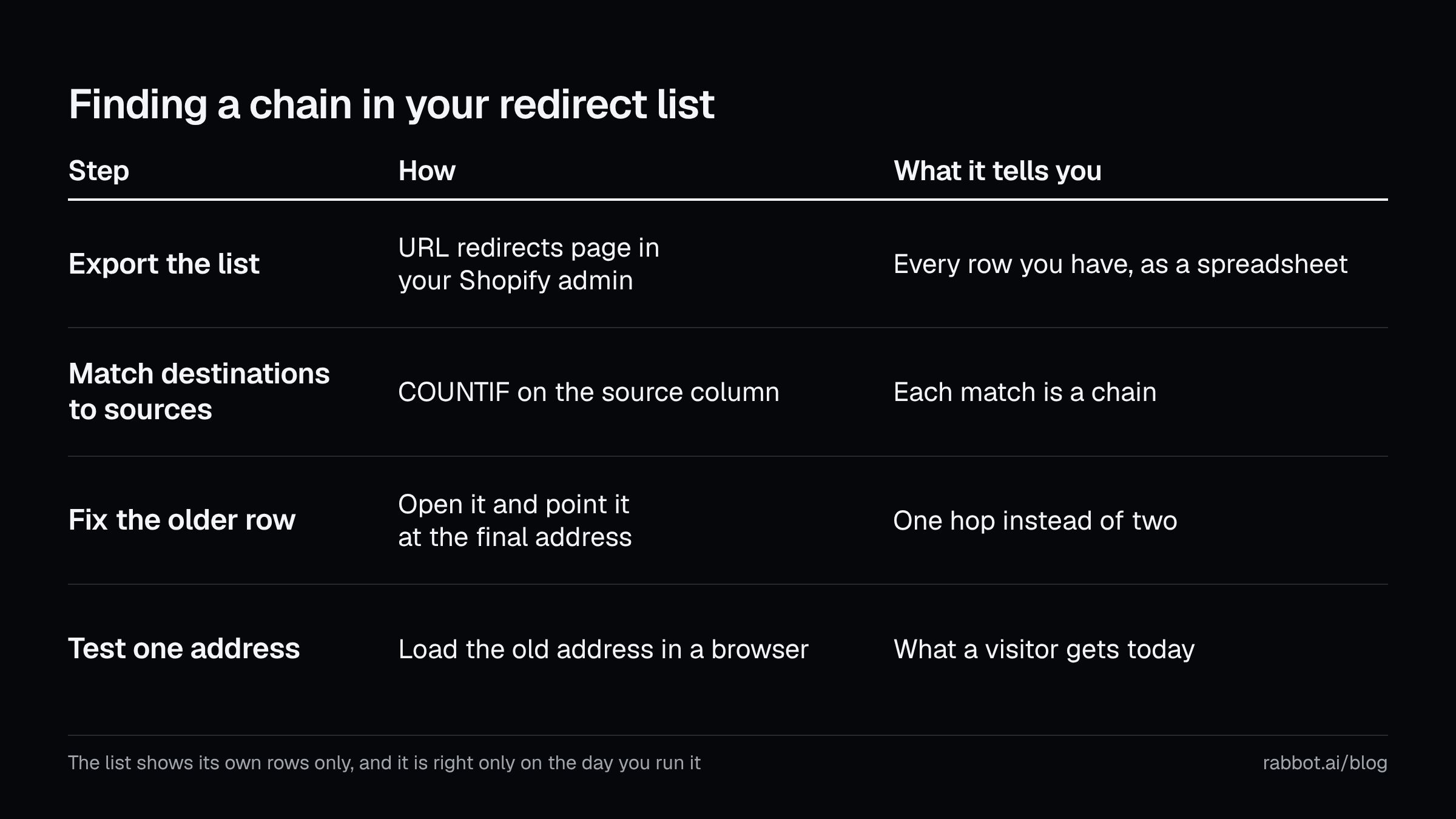
To fix one, open the older redirect (the help page says you click it to edit) and point it at the final address. My advice is to do it when you rename, while you still know which address is which. Then change your own menus and links to the new address, because Google says redirects “are slow for users”.
The check has two limits. The list shows only its own rows, so it misses hops that come from anywhere else, and it is right only on the day you run it. Shopify’s migration guide suggests loading the old address in a browser to confirm it lands on the new one, which tests one row at a time and shows what a visitor gets.
Rabbot’s part in this
I built Rabbot to watch Shopify stores, so weigh this section accordingly. Rabbot catches redirect loops outright, and it flags chains that grow a hop at a time. Rabbot does not create redirects on its own, so the rows stay yours to write. In the picture from earlier, it is the person who drives your routes on a schedule and reports a sign that has started pointing at another sign. It does not paint signs by itself.
Update, 8 October 2026: Rabbot now paints one kind of sign, when you ask. If a product’s old address shows Page not found, the finding offers to add the redirect, or to put the old address back, and a chain that grew a hop can be pointed straight at its end. You confirm each one first. Rabbot never removes or reverses a redirect you made, so the rows stay yours. Check my redirects walks through each card.
It checks the pages on your monitored list. The free plan checks the 20 pages you choose at least weekly, and paid plans check more pages every day. A check is a fetch and a read: Rabbot fetches the page a shopper’s browser would receive and compares what it finds with the last check, as how Rabbot checks your store explains. An issue closes only when a later live check no longer finds the problem, so flattening a chain does not close the issue until Rabbot has looked again. What counts as an issue describes what an issue looks like on your dashboard, and the features page lists this check as “Redirect loops and growing chains”.
The free store audit costs nothing and needs no install. It takes your store address and samples your homepage, up to eight product pages and three collections from your sitemap, the list of pages your store publishes for search engines. It reports whether the pages your sitemap lists load without a redirect. It is a single pass from outside, not day-to-day monitoring, so it cannot read your redirect list. It shows you what a visitor meets today.
What to keep
Keep two things. A redirect is one hop only until its destination moves, so every rename is a small reason to open the list again. And a visitor counts every hop, wherever it was set, which is more than the redirect list shows you.
Add the redirect, then fix your own links. After the next rename, open the list again.
Rabbot is on the Shopify App Store. Every paid plan starts with a 14-day trial. If you would rather have the watching done for you, Rabbot does that part for the pages it monitors.
Sources
- Shopify Help Center, “Creating and managing URL redirects” (help.shopify.com/en/manual/online-store/menus-and-links/url-redirect). Supports the admin path, the two fields, redirects starting immediately, the relative or full destination, the broken-URL rule, the typo and cache checks, editing and deleting a redirect, the 100,000 limit, the CSV import and export, the third-party app tip, the automatic deletion, and the absence of any mention of chains or loops among the redirects you write. Checked 2026-09-29.
- Shopify Help Center, sample redirect CSV template (help.shopify.com/csv/sample-redirect-template.csv). Supports the column names and the example row. Checked 2026-09-29.
- Shopify Help Center, “Managing collection settings” (help.shopify.com/en/manual/products/collections/collection-settings) and “Adding and updating products” (help.shopify.com/en/manual/products/add-update-products). Both support the generated handle and the warning about editing it too often. The collections page also supports the redirect choice. Checked 2026-09-29.
- Shopify developer documentation, ProductUpdateInput, GraphQL Admin API 2026-07 (shopify.dev/docs/api/admin-graphql/latest/input-objects/ProductUpdateInput). Supports the
redirectNewHandlefield. Checked 2026-09-29. - Shopify developer documentation, UrlRedirect object and urlRedirectCreate mutation, GraphQL Admin API 2026-07 (shopify.dev/docs/api/admin-graphql/latest/objects/UrlRedirect and shopify.dev/docs/api/admin-graphql/latest/mutations/urlRedirectCreate). Support the absence of any statement about what happens to an earlier redirect when its destination moves again. Checked 2026-09-29.
- Shopify Help Center, “Migrate to Shopify” (help.shopify.com/en/manual/migrating-to-shopify). Supports old links not loading after a move, redirects set up in advance, and the browser test. Checked 2026-09-29.
- Shopify Help Center, “Change your primary domain” (help.shopify.com/en/manual/domains/domain-type/change-primary-domain). Supports the automatic redirect to the primary domain. Checked 2026-09-29.
- Google Search Central, “Site Moves and Migrations”, last updated 2026-08-20 (developers.google.com/search/docs/crawling-indexing/site-move-with-url-changes). Supports the advice against chains, the “ideally no more than 3 and fewer than 5” figure, chaining adding latency for users, keeping redirects at least a year, and updating your own links because redirects are slow for users. Checked 2026-09-29.
- Google Search Central, “Redirects and Google Search”, last updated 2026-04-14 (developers.google.com/search/docs/crawling-indexing/301-redirects). Supports permanent redirects showing the new address and temporary ones the old. Checked 2026-09-29.
- Google Crawling infrastructure, “How HTTP status codes affect Google’s crawlers”, last updated 2026-02-04 (developers.google.com/crawling/docs/troubleshooting/http-status-codes). Supports the 10-hop limit and the 301 “strong signal”. Checked 2026-09-29.
- MDN, “Redirections in HTTP” (developer.mozilla.org/en-US/docs/Web/HTTP/Guides/Redirections), last modified 2026-08-27, and “301 Moved Permanently” (developer.mozilla.org/en-US/docs/Web/HTTP/Reference/Status/301), last modified 2026-06-22. Support how a 301 works, the extra round-trip, and redirect loops. Checked 2026-09-29.
- Rabbot, features, how Rabbot checks your store, what counts as an issue, which URLs Rabbot monitors, how often Rabbot checks your pages, the free store audit and the Shopify App Store listing (apps.shopify.com/rabbot). Support every statement about Rabbot here. Checked 2026-09-29.